
Download TweetReach – Twitter analytics, tweet impact, social media monitoring tool
Introduction to TweetReach
In the fast‑moving world of Twitter, knowing how far your messages travel can be the difference between a campaign that fizzles out and one that goes viral. TweetReach is a web‑based analytics platform designed to give you a clear picture of your tweet’s reach, retweets, mentions, and overall exposure. Whether you are a social media manager, a small business owner, or an influencer looking to fine‑tune your content strategy, TweetReach provides a quick, visual way to understand the impact of each tweet.
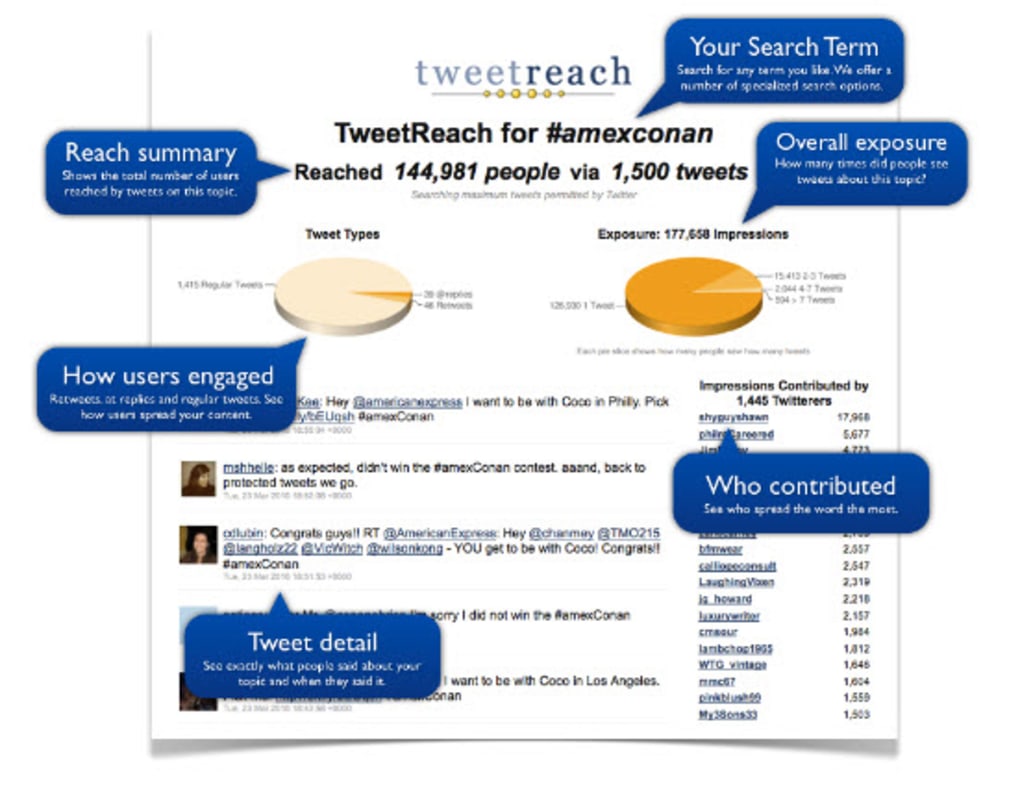
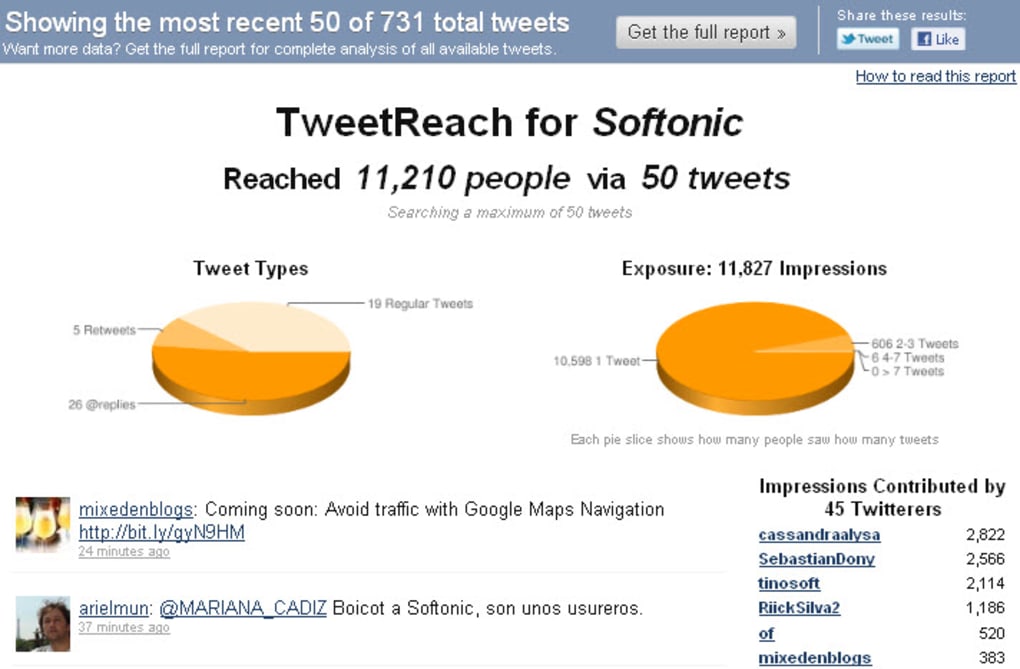
By entering a keyword, a specific Twitter handle, or a link, the tool scans the public Twitter stream, aggregates related tweets, and delivers a graphical report that breaks down the composition of regular tweets, retweets, and @‑replies. The report also estimates how many followers of the people who engaged with your term may have seen the content, giving you a proxy for potential impressions. While the free tier delivers essential metrics, a paid upgrade unlocks deeper insights and a detailed narrative of the data.
This review walks through the core features, setup process, system compatibility, and the pros and cons that every potential user should consider before deciding to download and use TweetReach.
Overview & Core Features of TweetReach
TweetReach’s primary value lies in its ability to transform raw tweet data into an easy‑to‑read visual summary. After you input a search term—be it a hashtag, a username, or a URL—the platform queries Twitter’s public API and compiles a list of all matching tweets within the selected time frame. The results are then displayed as a series of interactive graphs and tables that illustrate the distribution of tweet types, the total potential reach, and the engagement profile. Below is a concise list of the most notable features, each designed to help you measure and improve your Twitter strategy.
- Keyword, Username & URL Search: Flexible search options let you monitor specific hashtags, brand mentions, competitor activity, or any link you’ve shared.
- Graphical Reach Reports: Pie charts and bar graphs visualize the proportion of original tweets, retweets, and replies, as well as estimated total impressions.
- Potential Impressions Calculation: By aggregating follower counts of users who engaged with your term, TweetReach estimates how many eyes could have seen the conversation.
- Real‑Time Tweet Feed: Below each graph, you’ll find a live list of the actual tweets that match your query, complete with timestamps and user handles.
- Time‑Range Filtering: Choose custom periods—from the last hour to the past 30 days—to focus on short‑term campaigns or long‑term trends.
- Exportable Reports: Paid users can download PDF or CSV versions of the analysis for presentations or internal reporting.
- Multi‑Account Management: Manage several Twitter accounts from a single dashboard, ideal for agencies handling multiple clients.
- API Access (Premium): Developers can integrate TweetReach data into their own dashboards via a secure API.
The interface is intentionally minimalist: a single search bar at the top, a settings panel for date range and result limits, and the visual report area that updates automatically. While the free version caps the number of results and omits the narrative explanation that comes with the paid plan, the core data remains accurate and useful for most small‑to‑medium projects. Users have praised the clarity of the graphics and the speed at which results are generated, noting that even on a modest internet connection the tool responds within seconds.
Installation, Usage Instructions & Compatibility
TweetReach is a web‑based application, which means there is no traditional software download or installation process required. To get started, simply navigate to the official website using any modern browser (Chrome, Firefox, Edge, Safari) and create a free account. The registration process asks for an email address and a password, after which you’ll receive a verification link. Once verified, you can immediately begin analyzing tweets.
Step‑by‑Step Usage Guide
- Log In: Access your dashboard with your newly created credentials.
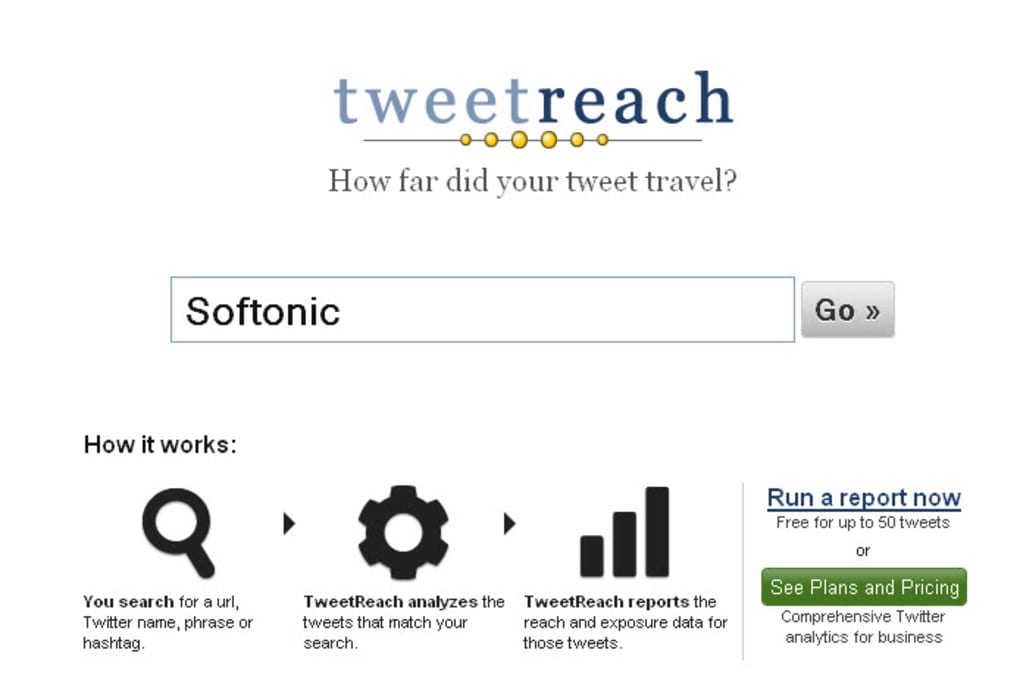
- Enter a Search Term: Type a hashtag, a Twitter handle (e.g., @YourBrand), or a URL into the search bar.
- Set Your Parameters: Choose the date range, result limit (up to 500 tweets for free users), and whether you want to include retweets and replies.
- Run the Query: Click “Analyze” and wait a few seconds while TweetReach pulls data from Twitter’s API.
- Review the Report: Examine the pie chart showing tweet types, the bar graph of potential impressions, and scroll down to read individual tweets.
- Export (Optional): If you have a premium subscription, click “Export” to download a PDF or CSV file.
Because the service runs entirely in the cloud, it is compatible with any operating system that can run a modern web browser. This includes Windows 10/11, macOS Ventura and later, Linux distributions, as well as mobile platforms like Android and iOS. The cross‑platform web app ensures that you can monitor tweet performance from a desktop workstation, a laptop, or even a smartphone while on the go.
For organizations that need deeper integration, the premium tier offers an API key. After generating the key in your account settings, developers can send HTTPS requests to retrieve JSON‑formatted reach data, which can then be fed into custom dashboards or BI tools. The API follows standard authentication practices (Bearer token) and respects Twitter’s rate limits, making it a secure and reliable option for larger teams.
Security is a priority: all data transfers occur over HTTPS, and the platform adheres to GDPR guidelines for user data handling. Passwords are stored using salted bcrypt hashes, and two‑factor authentication (2FA) is available for an extra layer of protection. Overall, the installation‑free, browser‑based approach combined with robust security measures makes TweetReach a hassle‑free solution for anyone needing quick Twitter analytics.
Pros, Cons & Frequently Asked Questions
Pros
- Instant, visual insight into tweet reach without complex setup.
- Free tier provides essential metrics for occasional users.
- Cross‑platform compatibility via any modern web browser.
- Accurate estimation of potential impressions based on follower counts.
- Exportable reports and API access for premium subscribers.
Cons
- Free version limits the number of tweets and omits detailed narrative analysis.
- Report layout can feel dense for beginners; some users report a learning curve.
- Reliance on Twitter’s public API means occasional rate‑limit delays during peak times.
- Advanced features (export, API) require a paid subscription.
Frequently Asked Questions
Can I use TweetReach without a Twitter account?
Yes. While you need a Twitter account to generate the data, you can create a TweetReach account using any email address. The analysis itself does not require you to log in to Twitter.
How accurate are the “potential impressions” numbers?
The figures are estimates based on the total follower count of users who mentioned your term. They do not account for private accounts, inactive followers, or Twitter’s algorithmic timeline, but they provide a solid upper‑bound for reach.
Is there a mobile app for TweetReach?
TweetReach is currently only available as a responsive web app. It works well on mobile browsers, but there is no dedicated iOS or Android app at this time.
What is the pricing for the premium version?
The premium subscription starts at $19 per month, offering unlimited tweet analysis, export options, detailed narrative reports, and API access. Annual plans provide a discount of up to 20%.
Can I analyze tweets older than 30 days?
The free tier limits analysis to the most recent 30 days. Premium users can extend the date range up to one year, depending on the plan selected.
Conclusion – Should You Download TweetReach?
TweetReach fills a niche that many social media managers overlook: a quick, visual snapshot of how far a tweet travels beyond simple likes and retweets. Its browser‑based design eliminates the need for downloads or installations, making it instantly accessible on Windows, macOS, Linux, Android, or iOS devices. The free version delivers enough data for casual users, while the paid tier scales nicely for agencies and businesses that require deeper insights, export capabilities, and API integration. Though the interface may feel a bit data‑dense for newcomers and the narrative explanations sit behind a paywall, the core metrics are reliable and presented in an easy‑to‑interpret format. If you regularly craft Twitter campaigns and need to justify ROI to stakeholders, or simply want to understand the organic spread of your brand’s hashtags, TweetReach is a worthwhile tool to add to your analytics arsenal.
Ready to see how far your tweets really go? Download TweetReach now, start with the free plan, and decide if the premium features align with your social media goals. Measuring reach has never been this straightforward—take the first step toward data‑driven tweeting today.



.png)



